java, c, c++, swift 프로그래밍 언어에서 parameter와 argument가 무엇인지 예를 들어 설명해줘
//c언어 소스
Void sayHello () {
    printf("hi");
}

//swift로 수정
func sayHello() -> void{
    print("Hi")
}

//수정2
func sayHello() -> Void {
    print("Hi")
}
sayHello()

//수정3
func sayHello(){
    print("Hi")
}
sayHello()
func로 시작
void형 함수는 -> Void 생략할 수 있음
swift에서 함수를 만들고 사용하는 방법을 설명
함수정의
Swift에서 함수는 func 키워드를 사용하여 정의합니다.
기본 함수 구조
func functionName(parameterName: Type) -> ReturnType {
    // 함수 내용
    return value
}
함수예시1
1. 매개변수와 반환값이 없는 함수
func sayHello() {
    print("Hello, World!")
}

// 함수 호출
sayHello()
2.
func greet(name: String) {
    print("Hello, \(name)!")
}

// 함수 호출
greet(name: "Alice")
3.
func addNumbers(a: Int, b: Int) -> Int {
    return a + b
}

// 함수 호출
let result = addNumbers(a: 5, b: 3)
print("Sum: \(result)")
4.
func divide(dividend: Int, by divisor: Int) -> Double {
    return Double(dividend) / Double(divisor)
}

// 함수 호출
let quotient = divide(dividend: 10, by: 3)
print("Result: \(quotient)")
5.
func powerOf(number: Int, to power: Int = 2) -> Int {
    return Int(pow(Double(number), Double(power)))
}

// 함수 호출
let squared = powerOf(number: 5)  // 기본값 사용
let cubed = powerOf(number: 5, to: 3)
print("5 squared: \(squared), 5 cubed: \(cubed)")
6.
func calculateAverage(_ numbers: Double...) -> Double {
    let total = numbers.reduce(0, +)
    return total / Double(numbers.count)
}

// 함수 호출
let avg = calculateAverage(1.5, 2.5, 3.5, 4.5)
print("Average: \(avg)")
7.
let mathOperation: (Int, Int) -> Int = addNumbers
let result = mathOperation(10, 20)
print("Result of math operation: \(result)")
실습 소스1
//C, C++ 소스
int add(int x, int y)  {
       return(x+y);
}
add(10,20);

//swift 소스
func add(x : Int, y : Int) -> Int {
    return(x+y)
}
add(10, 20)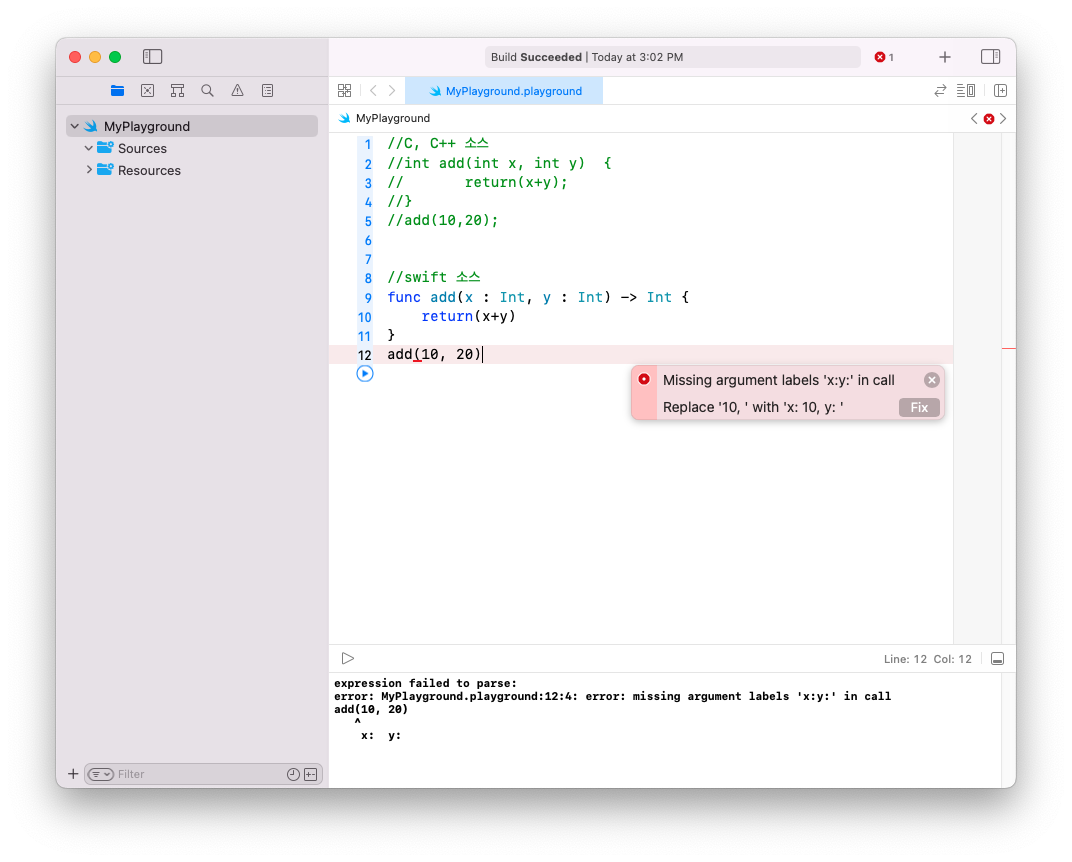
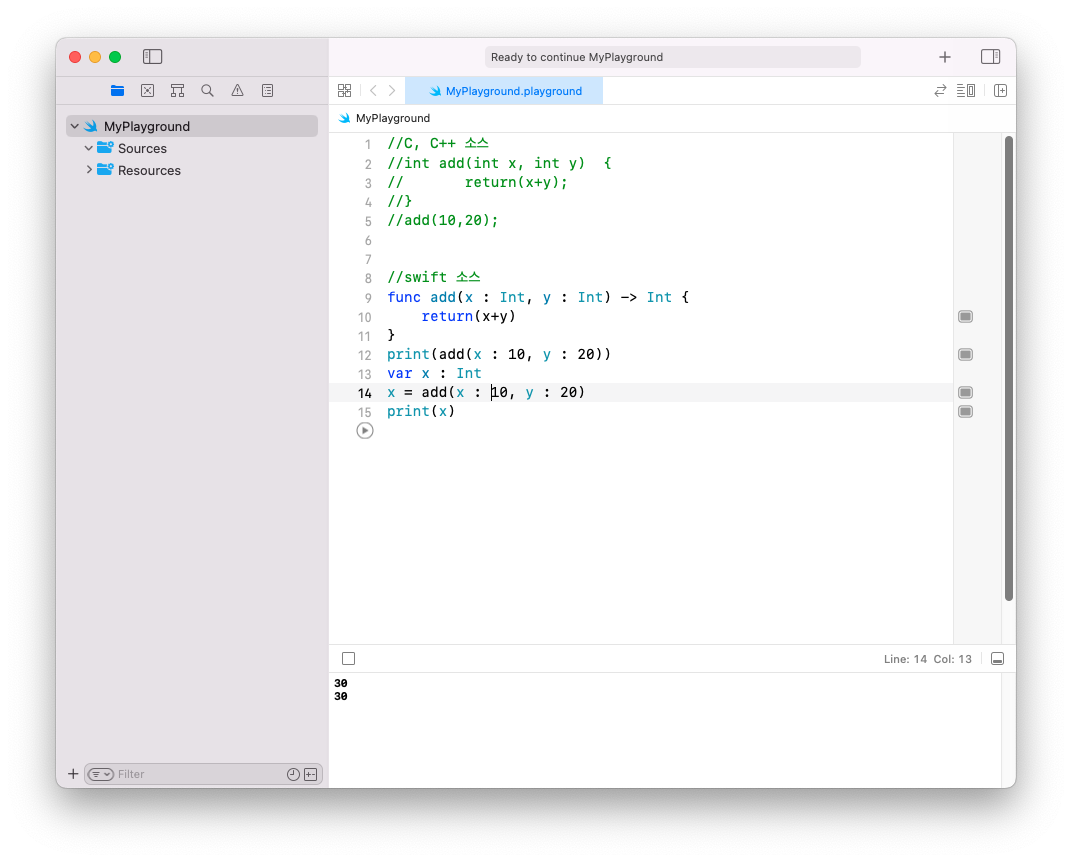
func add(x : Int, y : Int) -> Int {
    return(x+y)
}
print(add(x : 10, y : 20))
var x : Int
x = add(x : 10, y : 20)
print(x)
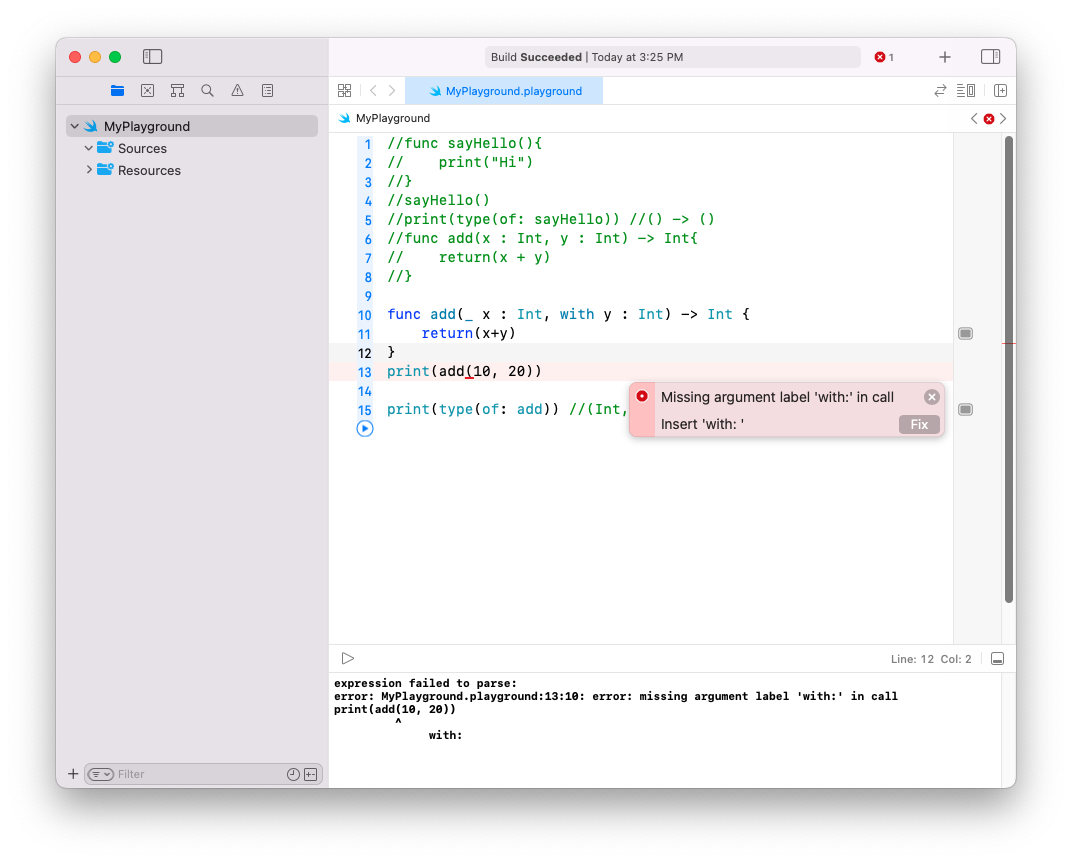
print(type(of: add)) //(Int, Int) -> Int
함수의타입 (자료형,자료형,…) -> 리턴형
(Int, Int) -> Int 리턴형이Void형이면()
func sayHello(){
    print("Hi")
}
sayHello()
print(type(of: sayHello)) //() -> ()

func add(x : Int, y : Int) -> Int {
    return(x+y)
}
print(add(x : 10, y : 20))
var x : Int
x = add(x : 10, y : 20)
print(x)
print(type(of: add)) //(Int, Int) -> Int
내부 매개변수(parameter name) 이름과 외부 매개변수(argument label) 이름
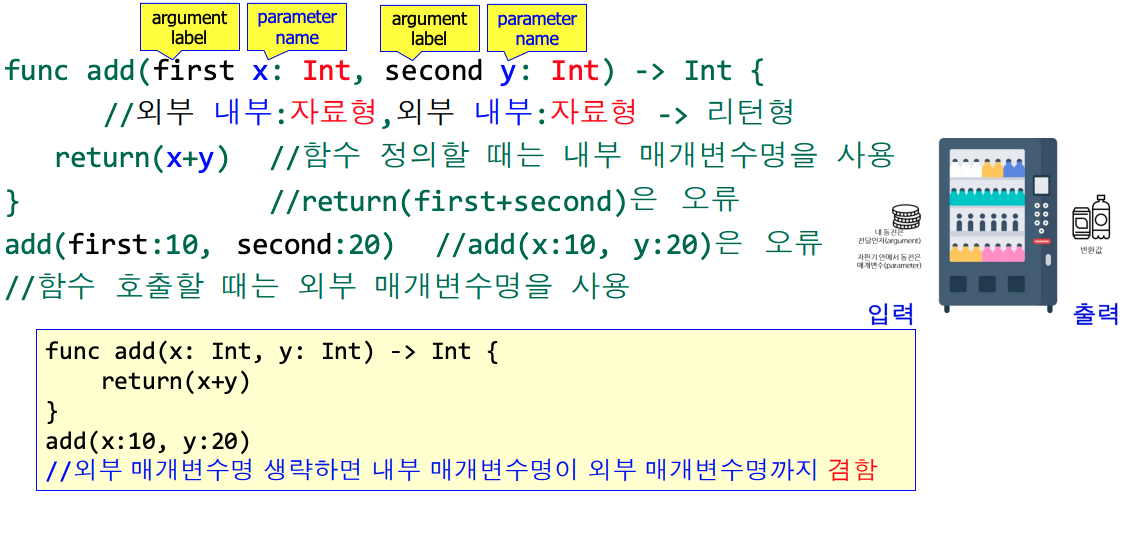
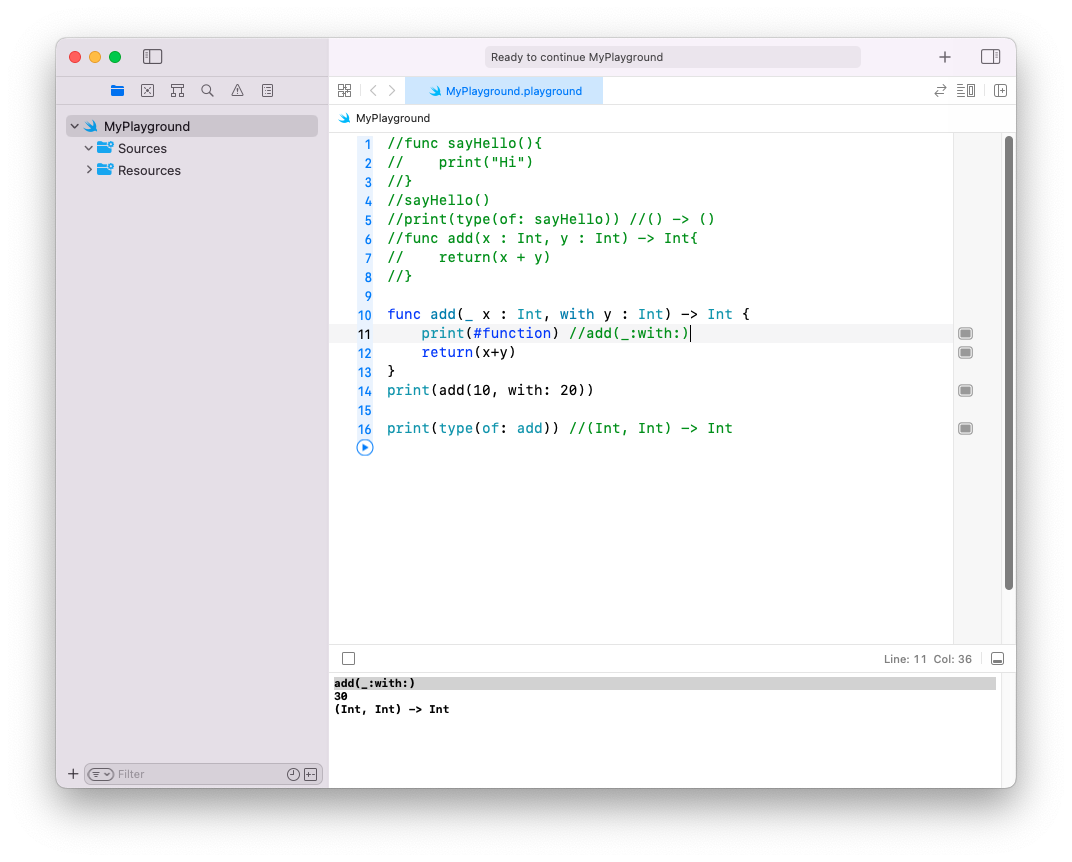
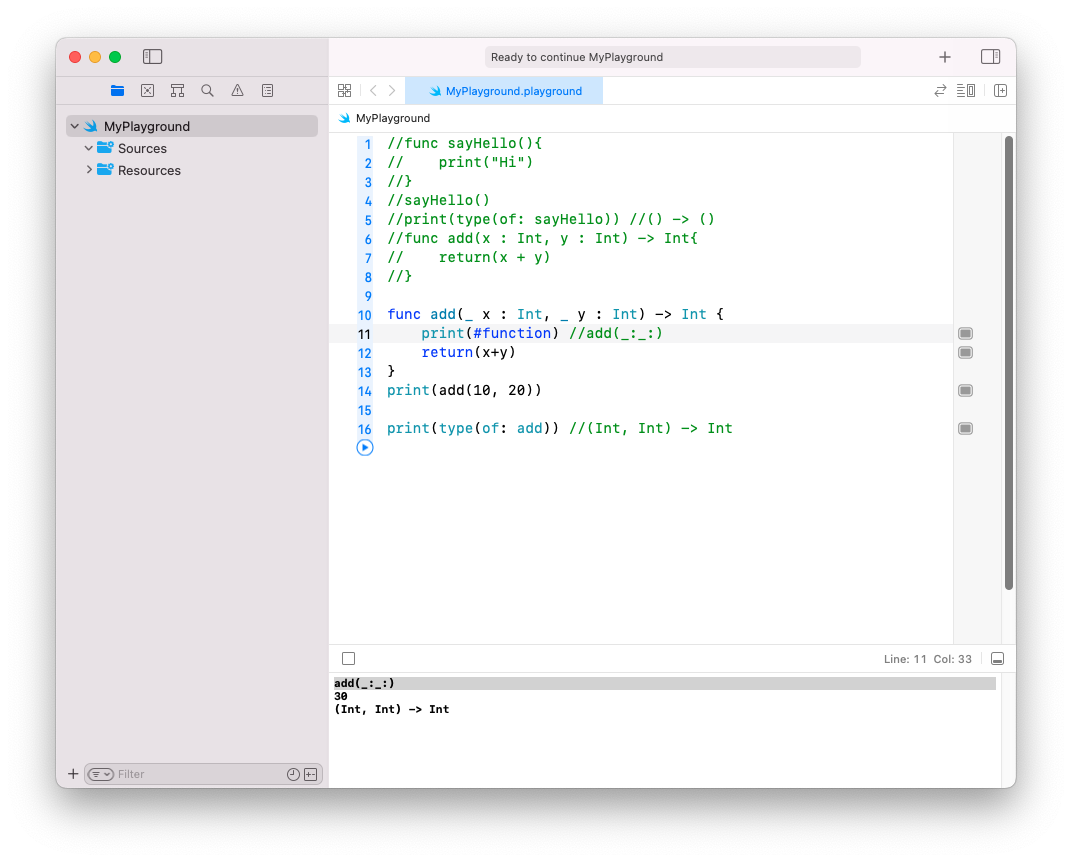

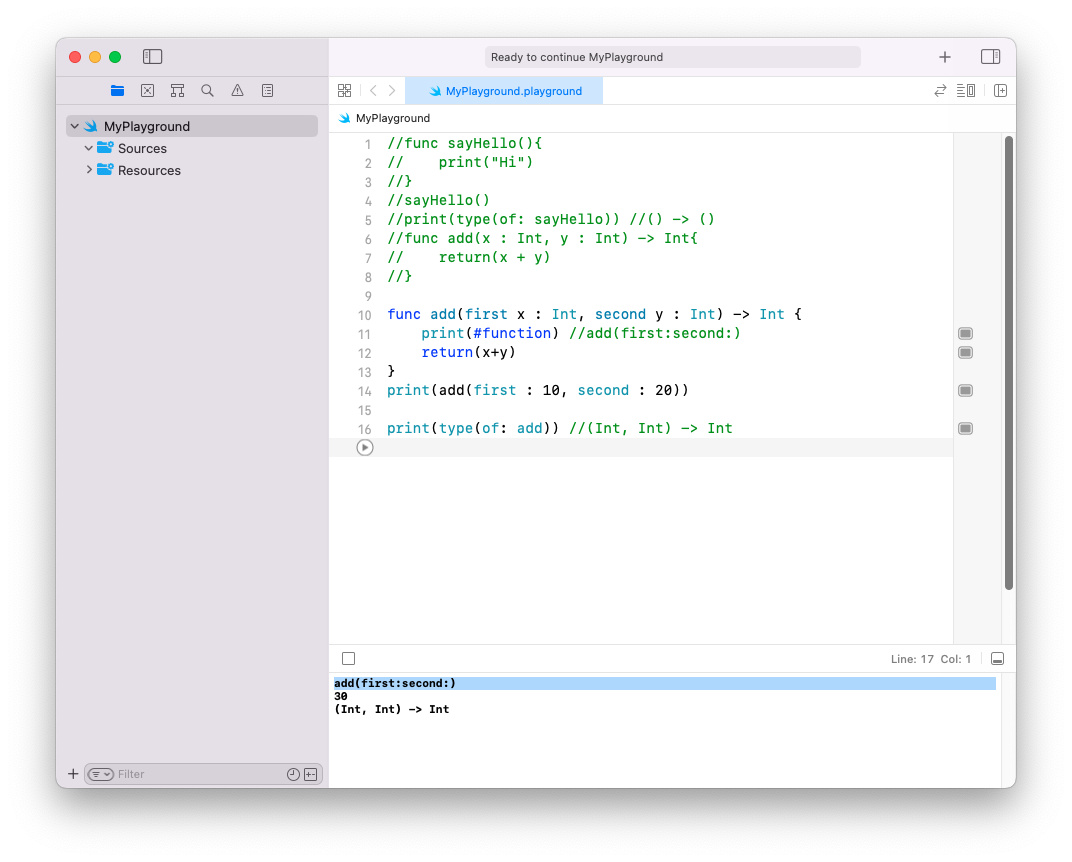
Swift 함수명
> 함수명(외부매개변수명:외부매개변수명: ...)
func tableView(_ tableView: UITableView,numberOfRowsInSection section: Int) -> Int { return items.count }
자료형 : (UITableView, Int) -> Int
func tableView(_ tableView: UITableView, cellForRowAt indexPath: IndexPath) -> UITableViewCell { return cell }
자료형 : tableView(_ : numberOfRowsInSection:)
if문 참일 때 실행
var x = 1
while true {
    guard x < 5 else { break }//조건(x<5)이 거짓일 때 실행(break)
    //if x > 4 {break}
    print(x) //1 2 3 4, 조건(x<5)이 참일 때 실행
    x = x + 1
}
guard let~else로 옵셔널 바인딩
func multiplyByTen(value: Int?) {
  guard let number = value else {//조건식이 거짓(nil)일 때 else 블록 실행
     print("nil")
     return
  }
  print(number*10) //조건식이 참일 때 실행, 주의 : number를 guard문 밖인 여기서도 사용 가능
}
multiplyByTen(value: 3)   //30
multiplyByTen(value: nil) //nil
multiplyByTen(value: 10) //100
언래핑된 number 변수를 guard문 밖에 있는 코드가 사용할 수 있다!!
> if문을 이용하여 언래핑된 변수는 그렇게 못함
guard~let vs if~let
// Int? 타입의 옵셔널 매개변수를 받는 함수 정의
func multiplyByTen(value: Int?) {
    // guard let을 사용한 옵셔널 바인딩
    guard let number = value else {
        // value가 nil인 경우 함수 즉시 종료
        return
    }
    // value가 nil이 아닌 경우, number에 언래핑된 값이 할당됨
    // number를 10배 곱한 결과 출력
    print(number * 10)

    // if let을 사용한 옵셔널 바인딩
    if let number = value {
        // value가 nil이 아닌 경우
        // number를 10배 곱한 결과 출력
        print(number * 10)
    }
    else {
        // value가 nil인 경우 "nil" 출력
        print("nil")
    }
}

// 함수 호출 예시들

// 3을 전달하여 함수 호출
multiplyByTen(value: 3)   // 출력: 30 (guard let에서) 30 (if let에서)

// nil을 전달하여 함수 호출
multiplyByTen(value: nil) // 출력: nil (if let의 else 블록에서만)

// 10을 전달하여 함수 호출
multiplyByTen(value: 10)  // 출력: 100 (guard let에서) 100 (if let에서)
디폴트 매개변수를 작성하는 방법을 java, c, c++, swift, python 프로그래밍 언어 예를 들어 알려줘
2개의 정수를 입력받아 가감제 리턴
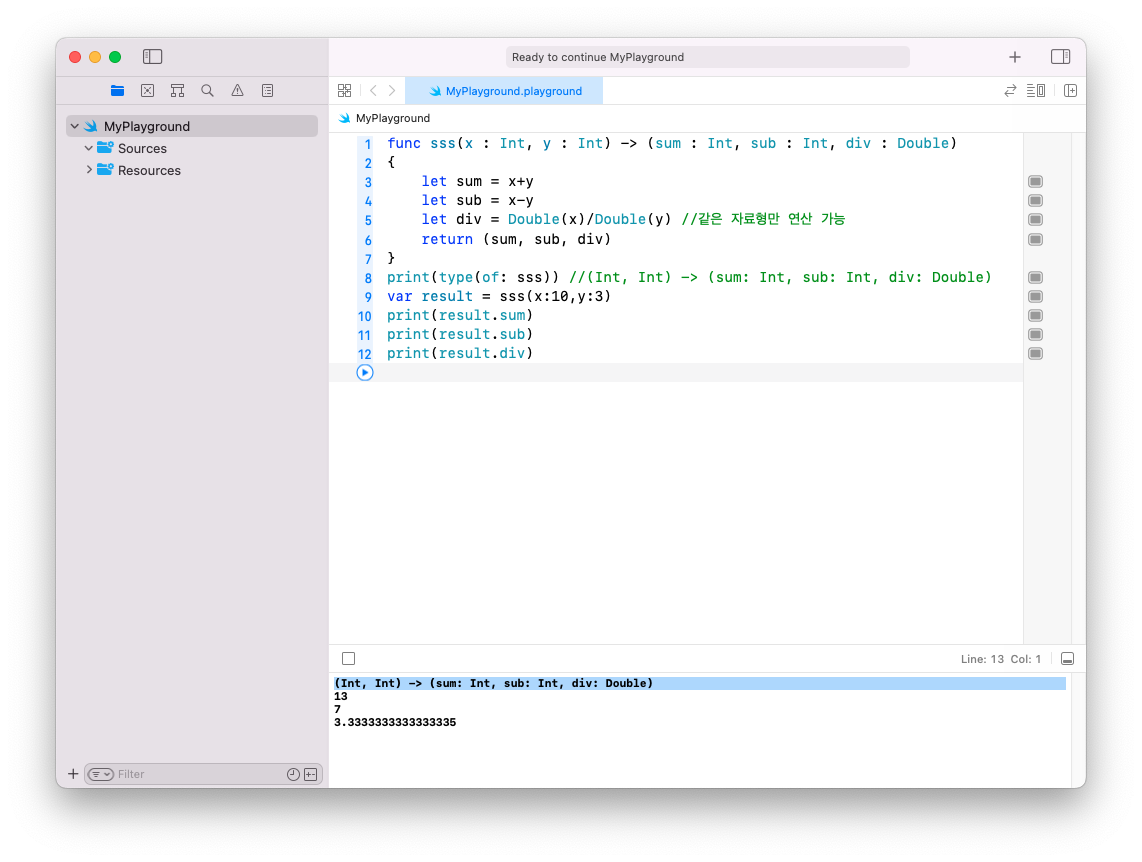
가변 매개변수(variadic parameter)

func displayStrings(strings: String...)
{
  for string in strings {
    print(string)
  }
}
displayStrings(strings: "일", "이", "삼", "사")
displayStrings(strings: "one", "two")
Swift 3에서는 inout의 위치가 바뀜
var myValue = 10
func doubleValue (value: inout Int) -> Int {
//call by address하고 싶은 매개변수의 자료형 앞에 inout 씀
  value += value
  return(value)
}
print(myValue)
print(doubleValue(value : &myValue))  //출력 값? 10 20 30
// call by address하고 싶은 변수에 &붙여서 호출
print(myValue)
IOS 강의 자료 참고했습니다.
'iOS프로그래밍 기초' 카테고리의 다른 글
| [IOS 기초] 10주 BMI 판정,동영상 재생,웹뷰 앱 (2) | 2024.11.07 |
|---|---|
| [IOS 기초] 9주 (2) | 2024.10.31 |
| [IOS 기초] 7주 Xcode로 간단한 앱 개발 (0) | 2024.10.17 |
| [IOS 기초] 6주 Swift 문법 5(클래스 failable initializer 상속)파일 (4) | 2024.10.10 |
| [IOS 기초] 5주 Swift 문법 4(일급시민 클로저 기초)파일 (0) | 2024.10.09 |
| [iOS프로그래밍 기초] 3주 Swift 문법 2(optional, as, nil, Any, AnyObject, 연산자, 제어문1) (0) | 2024.09.19 |
| [iOS프로그래밍 기초] 2주 Swift 문법 1(웹스토어, 자료형,변수,상수, tuple) (0) | 2024.09.12 |
| [iOS프로그래밍 기초] 1주 iOS 프로그래밍 개요 (1) | 2024.09.05 |


