JSONDecoder
func decode<T>(_ type: T.Type, from: Data) throws -> T| T | 제네릭 타입: 아무 타입이나 들어올 수 있음 (단, Codable 같은 제약이 있을 수도 있어요) |
| (_ type: T.Type, from: Data) | 어떤 타입(T)으로 변환할 건지, 어떤 데이터(Data)를 변환할 건지 |
| throws | 오류가 날 수 있으니, 반드시 try와 함께 써야 함 |
| -> T | 변환된 결과를 T 타입으로 리턴 |

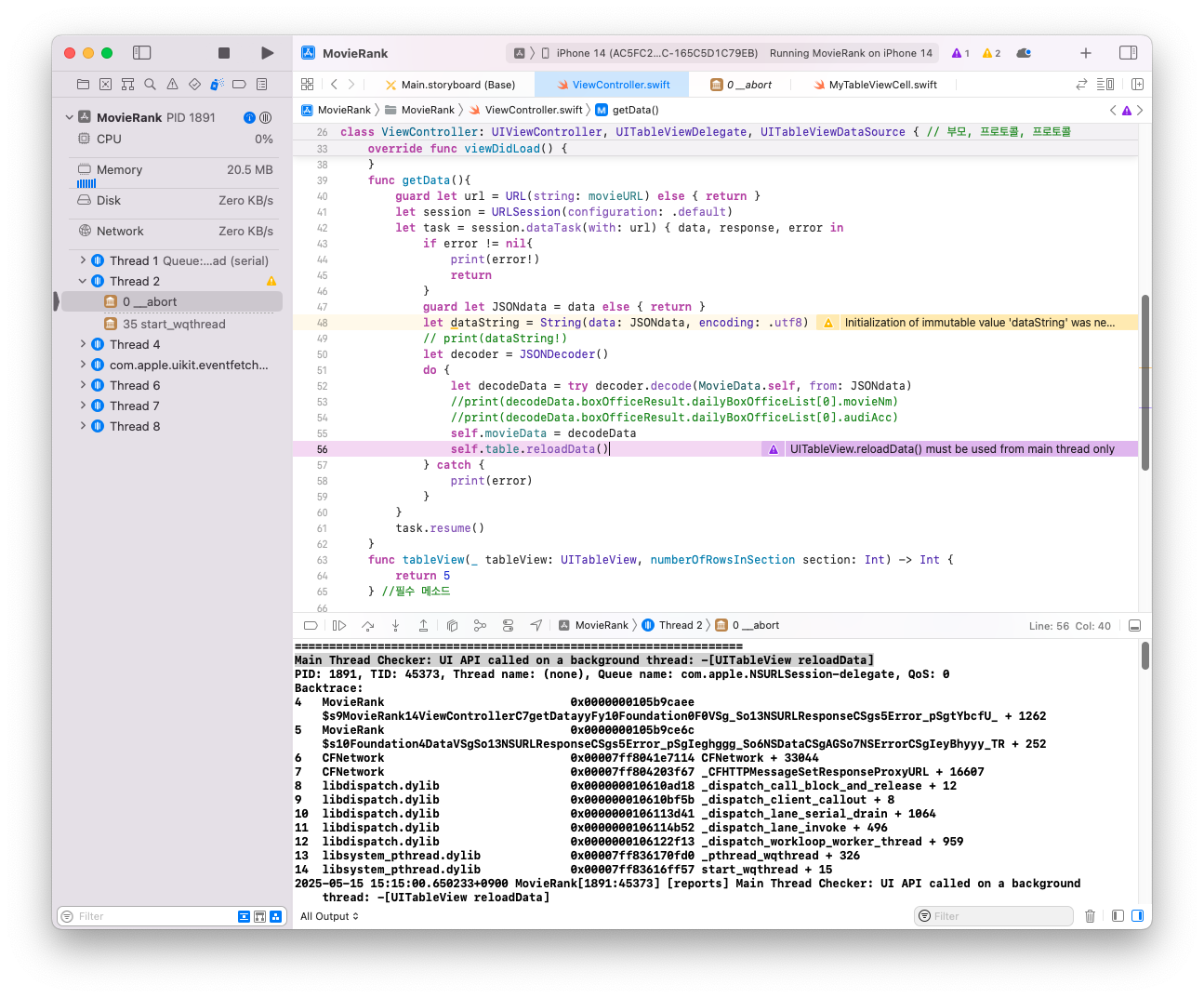
오류가 난 이유 : 예외처리 안해서 오류 남

오류가 난 이유 :


//
//  ViewController.swift
//  MovieRank
//
//  Created by 소프트웨어컴퓨터 on 2025/05/08.
//

import UIKit
let name = ["야당1", "야당2", "야당3", "야당4", "야당5"]


struct MovieData : Codable {
    let boxOfficeResult : BoxOfficeResult
}
struct BoxOfficeResult : Codable {
    let dailyBoxOfficeList : [DailyBoxOfficeList]
}
struct DailyBoxOfficeList : Codable {
    let movieNm : String
    let audiCnt : String
    let audiAcc : String
    let rank : String
}


class ViewController: UIViewController, UITableViewDelegate, UITableViewDataSource { // 부모, 프로토콜, 프로토콜

    @IBOutlet weak var table: UITableView!
    var movieData : MovieData?
    let movieURL =
    "https://kobis.or.kr/kobisopenapi/webservice/rest/boxoffice/searchDailyBoxOfficeList.json?key=10ae13c38e978374fb340cf796c32e6e&targetDt=20250514"

    override func viewDidLoad() {
        super.viewDidLoad()
        table.dataSource = self
        table.delegate = self
        getData()
    }
    func getData(){
        guard let url = URL(string: movieURL) else { return }
        let session = URLSession(configuration: .default)
        let task = session.dataTask(with: url) { data, response, error in
            if error != nil{
                print(error!)
                return
            }
            guard let JSONdata = data else { return }
            let dataString = String(data: JSONdata, encoding: .utf8)
            // print(dataString!)
            let decoder = JSONDecoder()
            do {
                let decodeData = try decoder.decode(MovieData.self, from: JSONdata)
                //print(decodeData.boxOfficeResult.dailyBoxOfficeList[0].movieNm)
                //print(decodeData.boxOfficeResult.dailyBoxOfficeList[0].audiAcc)
                self.movieData = decodeData
                DispatchQueue.main.async {
                    self.table.reloadData()
                }
            } catch {
                print(error)
            }
        }
        task.resume()
    }
    func tableView(_ tableView: UITableView, numberOfRowsInSection section: Int) -> Int {
        return 10
    } //필수 메소드

    func tableView(_ tableView: UITableView, cellForRowAt indexPath: IndexPath) -> UITableViewCell {
        let cell = tableView.dequeueReusableCell(withIdentifier: "myCell", for: indexPath) as! MyTableViewCell
        cell.movieName.text = movieData?.boxOfficeResult.dailyBoxOfficeList[indexPath.row].movieNm
        //print(indexPath.description)
        return cell
    } //필수 메소드
    func tableView(_ tableView: UITableView, didSelectRowAt indexPath: IndexPath) {
        print(indexPath.description)
    }
    func numberOfSections(in tableView: UITableView) -> Int {
        return 1
    }
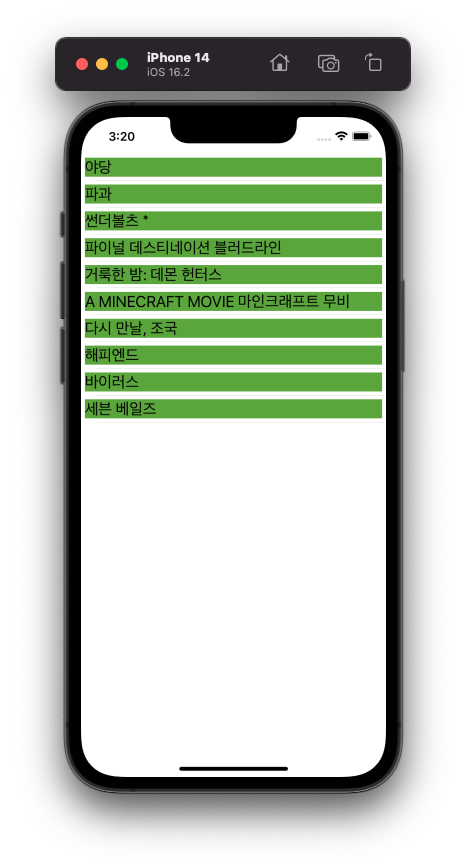
}
yyyyMMDD형식으로 어제의 날짜를 문자열로 반환하는 makeYesterdayString() 메서드를 Swift로 작성
func makeYesterdayString() -> String {
    let calendar = Calendar.current                  // 현재 달력 사용
    let today = Date()                               // 오늘 날짜
    guard let yesterday = calendar.date(byAdding: .day, value: -1, to: today) else {
        return ""                                     // 실패 시 빈 문자열 반환
    }

    let formatter = DateFormatter()                 // 날짜 형식 변환기
    formatter.dateFormat = "yyyyMMdd"               // 원하는 출력 형식
    return formatter.string(from: yesterday)        // 어제를 문자열로 변환해 반환
}
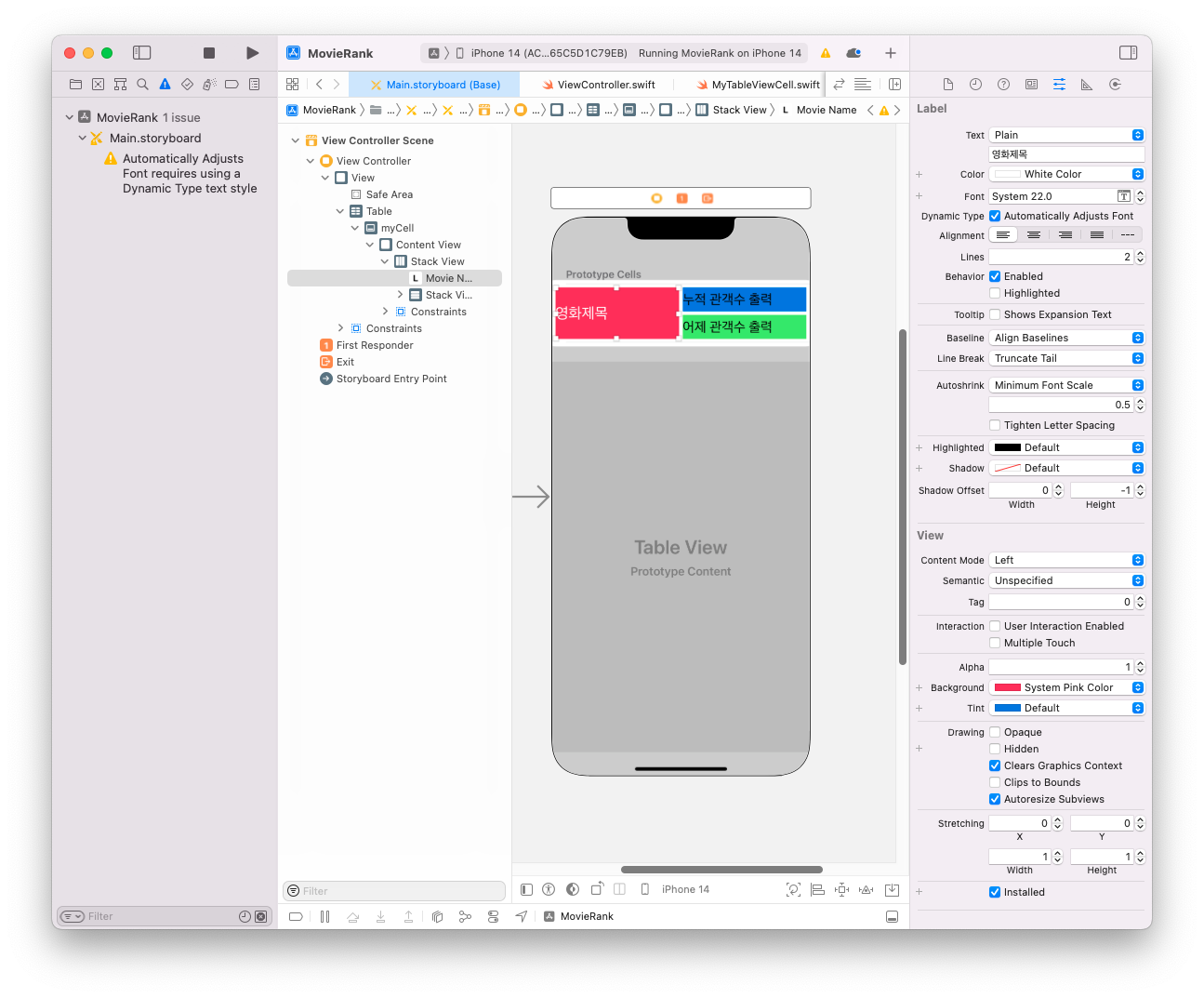
Stack View의 constraint

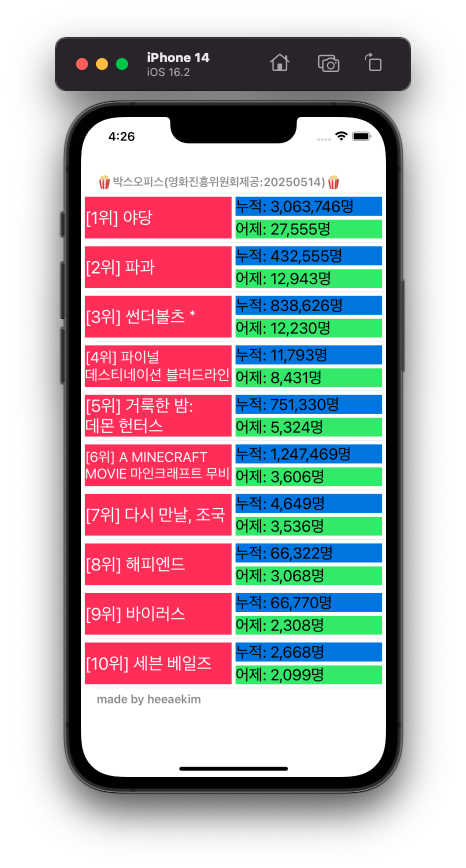
천(3자리)단위 콤마찍는 소스
    func  tableView(_ tableView: UITableView, cellForRowAt indexPath: IndexPath) -> UITableViewCell {
            let cell = tableView.dequeueReusableCell(withIdentifier: "myCell", for: indexPath) as! MyTableViewCell
            guard  let mRank = movieData?.boxOfficeResult.dailyBoxOfficeList[indexPath.row].rank  else {return  UITableViewCell()}
            guard  let mName = movieData?.boxOfficeResult.dailyBoxOfficeList[indexPath.row].movieNm  else {return UITableViewCell()}
            cell.movieName.text = "[\(mRank)위] \(mName)"
            if let aCnt = movieData?.boxOfficeResult.dailyBoxOfficeList[indexPath.row].audiCnt {
                let numF = NumberFormatter()
                numF.numberStyle = .decimal
                let aCount = Int(aCnt)!
                let result = numF.string(for: aCount)!+"명"
                cell.audiCount.text = "어제: \(result)"
            }
            if  let aAcc = movieData?.boxOfficeResult.dailyBoxOfficeList[indexPath.row].audiAcc {
                let numF = NumberFormatter()
                numF.numberStyle = .decimal
                let aAcc1 = Int(aAcc)!
                let result = numF.string(for: aAcc1)!+"명"
                cell.audiAccumulate.text = "누적: \(result)"
            }
            return cell
    }
tableView(_:titleForHeaderInSection:)
    func tableView(_ tableView: UITableView, titleForHeaderInSection section: Int) -> String? {
        return "🍿박스오피스(영화진흥위원회제공:"+makeYesterdayString()+")🍿"
    }
    func tableView(_ tableView: UITableView, titleForFooterInSection section: Int) -> String? {
        return "made by heeaekim"
    }
영화 제목이 길어서 제목에 ...이 나온다면
iOS 강의 자료 참고했습니다.
'iOS프로그래밍 실무' 카테고리의 다른 글
| [iOS프로그래밍 실무] 12주차 (0) | 2025.05.28 |
|---|---|
| [iOS프로그래밍 실무] 10주차 (1) | 2025.05.08 |
| [iOS프로그래밍 실무] 9주차 (1) | 2025.05.07 |
| [iOS프로그래밍 실무] 7주차 (0) | 2025.04.17 |
| [iOS프로그래밍 실무] 6주차 (0) | 2025.04.10 |
| [iOS프로그래밍 실무] 5주차 (0) | 2025.04.03 |
| [iOS프로그래밍 실무] 4주차 (0) | 2025.03.27 |
| [iOS프로그래밍 실무] 3주차 (0) | 2025.03.20 |


